---
title: XolaBot Upsell Add-Ons
description: Learn how Xolabot's Upsell Add-Ons feature enhances your checkout process by suggesting popular add-ons to customers, increasing average order value. Configure which add-ons to promote, personalize the upsell message, and optimize the timing of suggestions to maximize conversions.
---
[Skip to content](https://support.xola.com/xolabot-upsell-add-ons#main-content)
English
Show submenu for translations
[](https://www.xola.com/)
- [Home](https://support.xola.com/)
- [24/7 Live Support](https://www.xola.com/support/)
Open main navigation
Close main navigation
- [Home](https://support.xola.com/)
- [24/7 Live Support](https://www.xola.com/support/)
- English
Show submenu for translations
- [Login](https://xola.com/_public/login.html)
[Login](https://xola.com/_public/login.html)
How can we help you?
- There are no suggestions because the search field is empty.
1. [Help Center](https://support.xola.com/?hsLang=en)
2. [Integrations & Advanced Tools](https://support.xola.com/integrations-advanced-tools?hsLang=en)
3. [Marketing & Tracking Integrations](https://support.xola.com/integrations-advanced-tools?hsLang=en#marketing-tracking-integrations)
# XolaBot Upsell Add-Ons
## Boost Revenue with XolaBot’s Smart Upsell Add-Ons
**XolaBot's Upsell Add-Ons feature** is designed to help you **increase revenue** by promoting **add-ons** at the perfect time—during the **checkout process**. With this feature, **XolaBot** automatically suggests that guests enhance their **reservation** by including **popular add-ons**—such as upgrades, merchandise, or additional services—before completing their purchase.
By intelligently recommending items that other customers frequently choose, **XolaBot** not only boosts your **average order value** but also improves the **guest experience** by making it easy for them to customize and enhance their booking.
**User Access:** **Administrator, Marketer** or **Curator** roles have access to set up XolaBot Upsell Add-Ons in Xola.
**Accountant** roles have access to XolaBot Earnings report.
To **grant access** to users, [click here](https://seller.xola.app/settings/users).
---
**What's covered in this article:**
- [Getting started with XolaBot Upsell Add-ons](https://support.xola.com/xolabot-upsell-add-ons#getting-started)
- [How to configure XolaBot Upsell Add-ons](https://support.xola.com/xolabot-upsell-add-ons#how-to-configure)
- [How it works on your website](https://support.xola.com/xolabot-upsell-add-ons#how-it-works)
---
### Getting started with XolaBot Upsell Add-ons
- Navigate to the **[Xola App Store](https://seller.xola.app/apps).**
- Locate **XolaBot Upsell Add-Ons** and select the App Store tile. 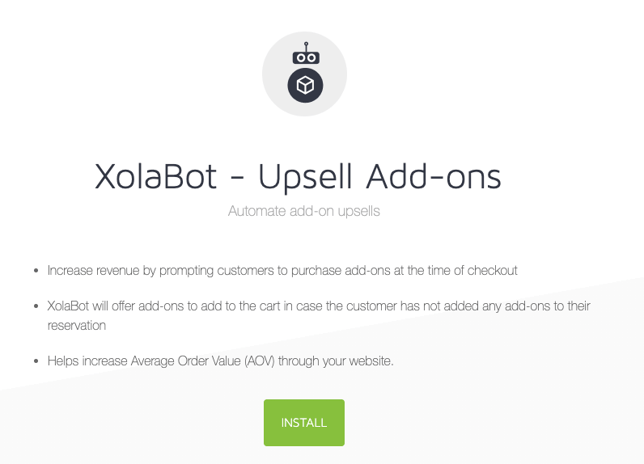
- Click the green **Install** button.
- Go to [Marketing \> XolaBot](https://seller.xola.app/marketing/xolabot) **\> Apps \> XolaBot Upsell Add-ons** and click on the **Configure** icon .
- Or go to [Settings\> App\>](https://seller.xola.app/settings/apps) **XolaBot Upsell Add-ons** and click on the **Configure.**
---
### How to configure XolaBot Upsell Add-ons
Once on the settings page, you have the following configuration options:
#### Personalize
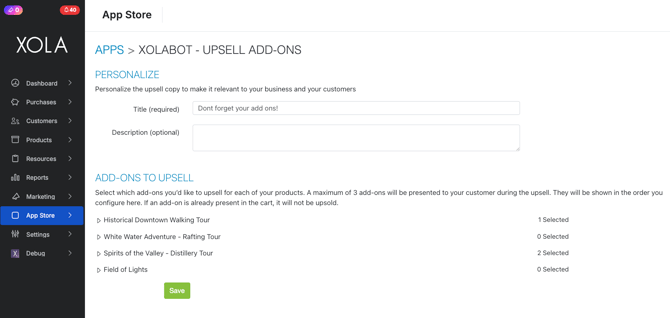
Personalize the upsell title to make it relevant to your business and your customers.
- **Title (required)**: Don't forget your add-ons!
- **Description (optional):** Enter a description for the upsell add-ons feature. Tell your customers why they should add these add-ons.
#### Add-ons to Upsell
Select which add-ons you’d like to upsell for each product.
- Each experience that has add-ons configured will be presented. Hit the arrow next to the experience to see the add-on for that experience.
- You can choose which add-on you would like to upsell by clicking the box next to it.
- To reorder the add-ons and the order shown to your customer, click and hold the three lines on the left side, then drag the add-on to the order you would like.
#### Things to keep in mind
- A maximum of 3 add-ons will be presented to your customer during the upsell.
- If an add-on is already in the cart, the customer will not be presented with further add-on upsell items. (Essentially, the customer only gets the upsell add-ons if no items are selected.)
- A customer can only purchase the add-on once. If they exit the pop-up, they will not see the upsell window option again.
- The Upsell Add-ons feature currently does not work on mobile.
- Upsell Add-ons will not work if your website's button redirects to a Xola-hosted page in a new tab.
- Upsell Add-ons will not work with Packages or Xola Distribution Partner Packages.
---
### How it works on your website
While a customer is checking out for an experience, XolaBot asks if they would be interested in purchasing an add-on based on your [configuration above](https://support.xola.com/xolabot-upsell-add-ons#how-to-configure). When the customer selects the **Continue** button at checkout, the next page shown will be the add-on upsell page.
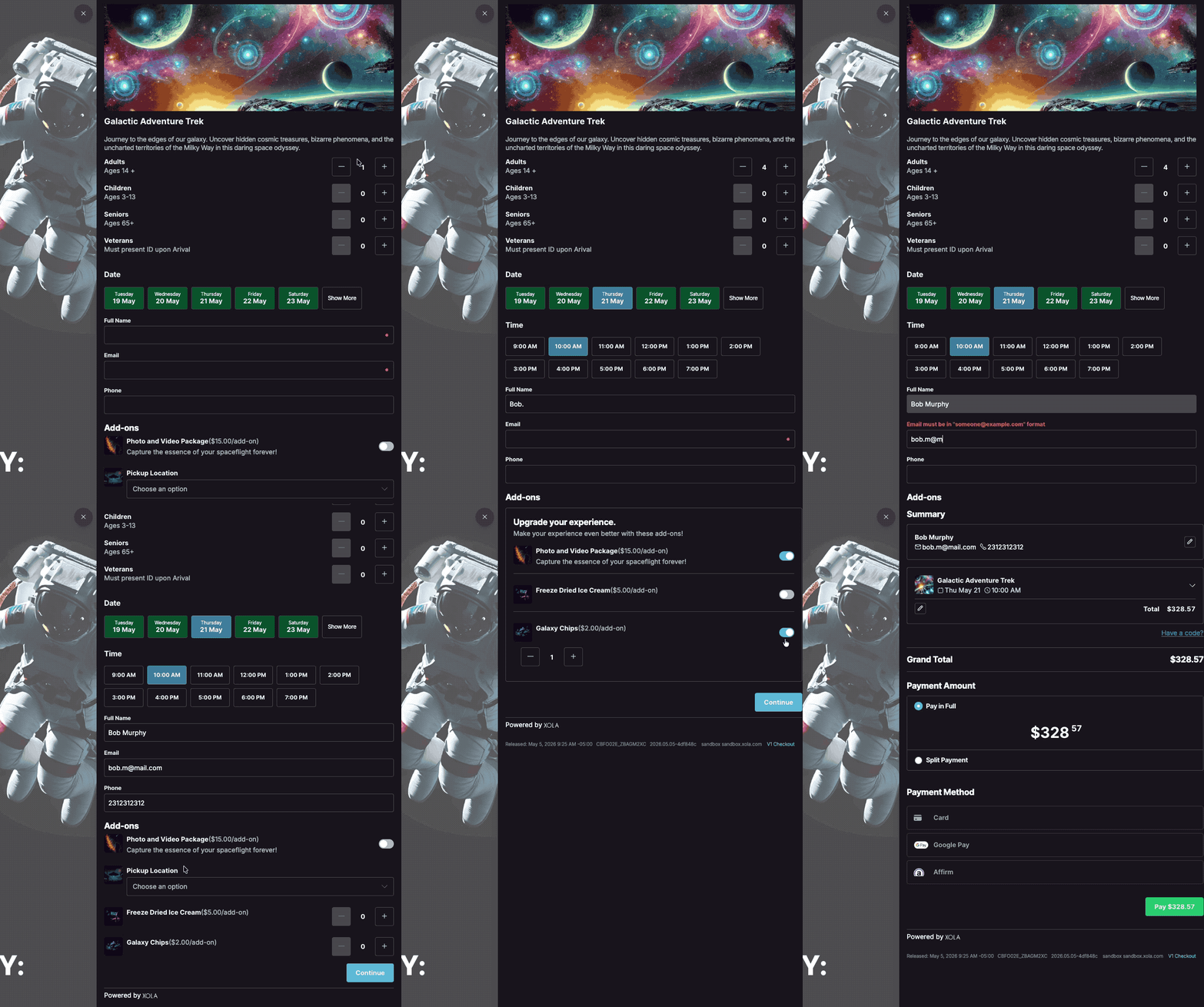
**Note:** Customers can purchase an add-on or say No thank you and continue the checkout.
- [Getting Started](https://support.xola.com/getting-started?hsLang=en#main-content)
- [Account Setup & Configuration](https://support.xola.com/getting-started?hsLang=en#account-setup-configuration)
- [Website Integration & Installation](https://support.xola.com/getting-started?hsLang=en#website-integration-installation)
- [Flex Plans](https://support.xola.com/getting-started?hsLang=en#flex-plans)
- [Managing Purchases & Customers](https://support.xola.com/managing-purchases-customers?hsLang=en#main-content)
- [Purchases Management](https://support.xola.com/managing-purchases-customers?hsLang=en#purchases-management)
- [Reservation Management](https://support.xola.com/managing-purchases-customers?hsLang=en#reservation-management)
- [Customer Management](https://support.xola.com/managing-purchases-customers?hsLang=en#customer-management)
- [Customer Data & Engagement](https://support.xola.com/managing-purchases-customers?hsLang=en#customer-data-engagement)
- [Reporting](https://support.xola.com/reporting?hsLang=en)
- [Integrations & Advanced Tools](https://support.xola.com/integrations-advanced-tools?hsLang=en#main-content)
- [Xola App Store Integrations](https://support.xola.com/integrations-advanced-tools?hsLang=en#xola-app-store-integrations)
- [Partner & Agent Management](https://support.xola.com/integrations-advanced-tools?hsLang=en#partner-agent-management)
- [Marketing & Tracking Integrations](https://support.xola.com/integrations-advanced-tools?hsLang=en#marketing-tracking-integrations)
- [Mobile and Hardware](https://support.xola.com/mobile-and-hardware?hsLang=en#main-content)
- [Mobile Tools and Apps](https://support.xola.com/mobile-and-hardware?hsLang=en#mobile-tools-and-apps)
- [Hardware Setup & Devices](https://support.xola.com/mobile-and-hardware?hsLang=en#hardware-setup-devices)
- Company
- [About Us](https://www.xola.com/about)
- [Careers](https://www.xola.com/team)
- [Press](https://www.xola.com/press)
- [Support](https://www.xola.com/support)
- [Security Policy](https://www.xola.com/security-policy/)
- Resources
- [Articles](https://www.xola.com/articles/)
- [Help Center](https://support.xola.com/)
- [Success Stories](https://www.xola.com/success-stories/)
- [App Store](https://www.xola.com/app-store)
- [Demo](https://www.xola.com/demo)
- [Xola Universe](https://www.xola.com/universe/)
- Documentation
- [API Documentation](https://developers.xola.com/)
- [Payment Services Agreement](https://www.xola.com/payment-services-agreement/)
- [Terms](https://www.xola.com/terms/)
[](https://www.xola.com/)
© 2026 Xola Inc. All rights reserved.
[Privacy Policy](https://www.xola.com/privacy-policy) [Terms of Service](https://www.xola.com/terms)