---
title: Pending Action Queue
description: This article explains the Pending Action Queue in Xola, accessible via the bell-shaped icon at the top left of your account. It details various action notifications that appear in this queue, including balance due alerts, pending purchases, and customer communications requiring attention.
---
[Skip to content](https://support.xola.com/pending-action-queue#main-content)
English
Show submenu for translations
[](https://www.xola.com/)
- [Home](https://support.xola.com/)
- [24/7 Live Support](https://www.xola.com/support/)
Open main navigation
Close main navigation
- [Home](https://support.xola.com/)
- [24/7 Live Support](https://www.xola.com/support/)
- English
Show submenu for translations
- [Login](https://xola.com/_public/login.html)
[Login](https://xola.com/_public/login.html)
How can we help you?
- There are no suggestions because the search field is empty.
1. [Help Center](https://support.xola.com/?hsLang=en)
2. [Managing Purchases & Customers](https://support.xola.com/managing-purchases-customers?hsLang=en)
3. [Customer Management](https://support.xola.com/managing-purchases-customers?hsLang=en#customer-management)
# Pending Action Queue
## Stay On Top of Important Tasks with the Pending Action Queue
The **Pending Action Queue** is conveniently located at the **top left corner** of your **Xola account**, represented by  **icon**. This queue serves as your central hub for **important action notifications** that require your attention, helping you stay on top of critical tasks without missing a beat.
Several types of notifications appear in this queue, including **balance due alerts**, **pending purchases**, and **communications from your customers** that need your prompt response. By consolidating these items in one place, the **Pending Action Queue** streamlines your workflow and ensures you never overlook anything important.
The queue **refreshes automatically every 5 minutes**, so any new updates or changes will appear quickly without the need for you to manually reload or refresh the page. This real-time updating helps you maintain timely responses and efficient management of your daily tasks.
**User Access:** **Administrator** or **Reservationist** roles have access to filtering and taking action from the Pending Action Queue.
To **grant access** to users, [click here](https://seller.xola.app/settings/users).
---
**What's covered in this article:**
- [Types of Purchases in the Pending Action Queue](https://support.xola.com/pending-action-queue#types-of-purchases)
- [Communications](https://support.xola.com/pending-action-queue#communications)
- [Filtering](https://support.xola.com/pending-action-queue#filtering)
---
### Types of Purchases in the Pending Action Queue
- **Abandoned Reservation:** If a customer begins the checkout process by entering reservation information on the **Purchases Details** page of your checkout window and reaches the **Payment Details** page but does not follow through with the purchase, this reservation will be considered "abandoned" after one hour of inactivity. From the Pending Action Queue, you can view these [abandoned reservations](https://support.xola.com/abandoned-reservation-recovery?hsLang=en) and contact the customer.
- **Balance Due Purchase:** A purchase with an open balance will remain in the Pending Action Queue until the balance has been fully collected. Click on the purchase to access the purchase detail page, and click on **Collect Balance** to settle up.
- **Refund Due:** A purchase with a refund due will remain in the Pending Action Queue until the [refund has been given to the customer or a booking value is decreased](https://support.xola.com/refunding-returning-payments-change-guest-quantity?hsLang=en). Click on the purchase to access the purchase detail page, and click on **Refund Excess Payment** to refund.
- **Invoice Due Purchase:** Like balance due and deposit purchases, purchases with open **[invoices](https://support.xola.com/invoicing?hsLang=en)** will remain in the Pending Action Queue until the rest of the balance has been fully collected. Click on the purchase to access the purchase details, and click on **Collect Balance** to settle up.
- **Pending Confirmation:** If purchases for certain products are on [manual acceptance](https://support.xola.com/xola-settings-?hsLang=en) or the trip minimum hasn't yet been met, they will remain in the Pending Action Queue until they are accepted or declined. From the Pending Action Queue, click on the purchase to access the purchase detail page, and then accept or decline the purchase.
- **No-Shows:** When a customer is marked as a [No-Show](https://support.xola.com/check-in-preferences?hsLang=en) and has a balance due, they are immediately sent into the Pending Action Queue. The purchase will remain here until the balance has been collected or until the customer has been booked into another experience.
- **Deposit Purchase:** Like balance-due purchases, purchases with open **[deposits](https://support.xola.com/down-deposit?hsLang=en)** will remain in the Pending Action Queue until the rest of the balance has been fully collected. Click on the purchase to access the purchase details, and click on **Collect Balance** to settle up.
---
### Communications
Unread Messages in the Pending Actions Queue are when a customer replies to any of the messages that are sent to them. If you click on the record, it will take you to the purchase to see the message, and you can respond to the customer from there.
**Note:** You must first send a message through Xola so the customer has the option to reply. You will not see any messages if the customer replies to an automated message (confirmation email, event reminder, etc). They must reply using the button shown in the message-specific email.
Unread Message notifications in the Pending Action Queue will only reflect the latest unread message per purchase. If a guest has sent you multiple messages, only the latest one will be reflected.
---
### Filtering
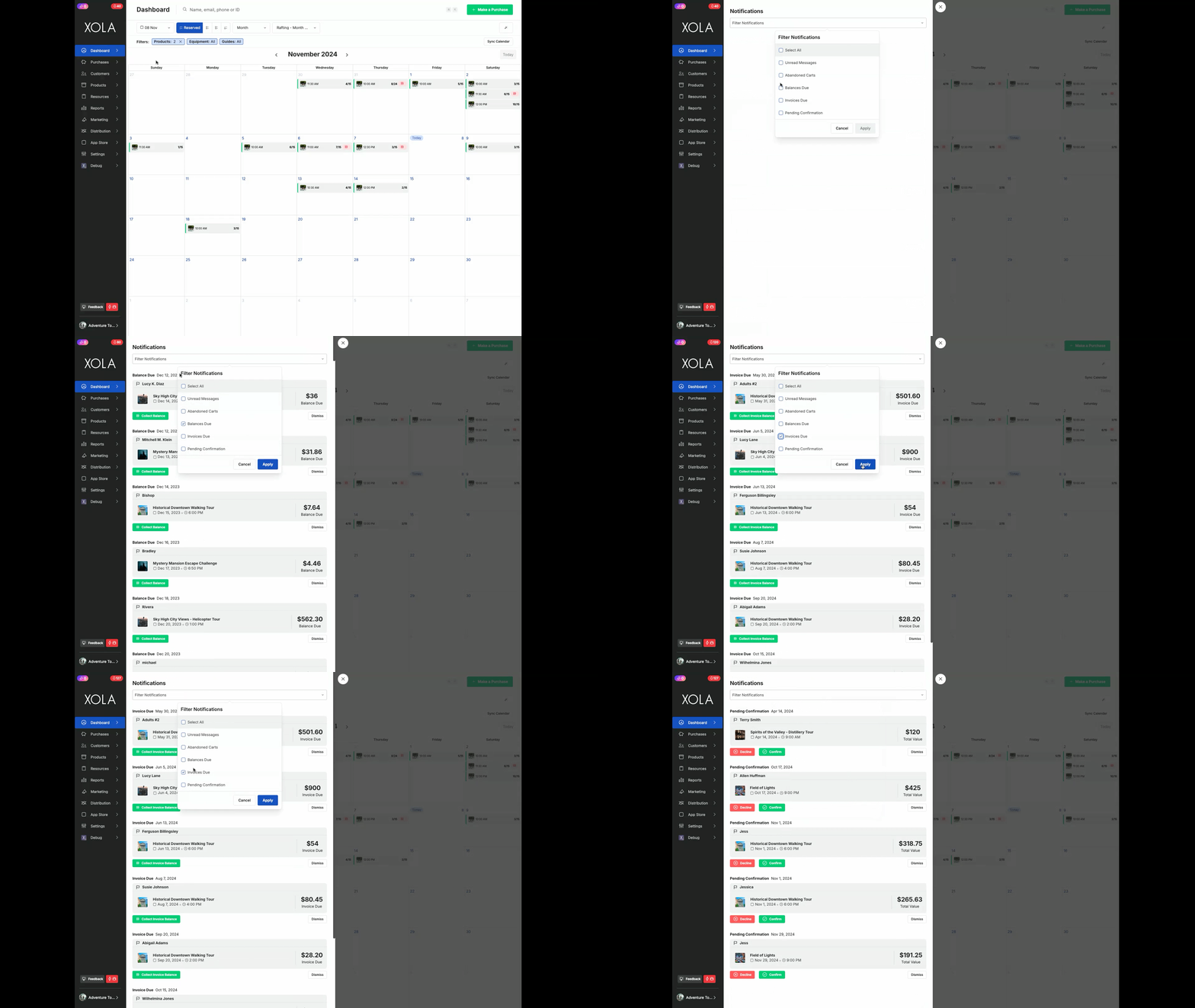
You can filter your pending action queue to show you the information you would like. For example to take a look at all of the reservations that have a balance due, you could sort the Pending Actions Queue by Balance Due. If you need to see who has not paid their invoice, you can sort by Invoice Due.
- [Getting Started](https://support.xola.com/getting-started?hsLang=en#main-content)
- [Account Setup & Configuration](https://support.xola.com/getting-started?hsLang=en#account-setup-configuration)
- [Website Integration & Installation](https://support.xola.com/getting-started?hsLang=en#website-integration-installation)
- [Flex Plans](https://support.xola.com/getting-started?hsLang=en#flex-plans)
- [Managing Purchases & Customers](https://support.xola.com/managing-purchases-customers?hsLang=en#main-content)
- [Purchases Management](https://support.xola.com/managing-purchases-customers?hsLang=en#purchases-management)
- [Reservation Management](https://support.xola.com/managing-purchases-customers?hsLang=en#reservation-management)
- [Customer Management](https://support.xola.com/managing-purchases-customers?hsLang=en#customer-management)
- [Customer Data & Engagement](https://support.xola.com/managing-purchases-customers?hsLang=en#customer-data-engagement)
- [Reporting](https://support.xola.com/reporting?hsLang=en)
- [Integrations & Advanced Tools](https://support.xola.com/integrations-advanced-tools?hsLang=en#main-content)
- [Xola App Store Integrations](https://support.xola.com/integrations-advanced-tools?hsLang=en#xola-app-store-integrations)
- [Partner & Agent Management](https://support.xola.com/integrations-advanced-tools?hsLang=en#partner-agent-management)
- [Marketing & Tracking Integrations](https://support.xola.com/integrations-advanced-tools?hsLang=en#marketing-tracking-integrations)
- [Mobile and Hardware](https://support.xola.com/mobile-and-hardware?hsLang=en#main-content)
- [Mobile Tools and Apps](https://support.xola.com/mobile-and-hardware?hsLang=en#mobile-tools-and-apps)
- [Hardware Setup & Devices](https://support.xola.com/mobile-and-hardware?hsLang=en#hardware-setup-devices)
- Company
- [About Us](https://www.xola.com/about)
- [Careers](https://www.xola.com/team)
- [Press](https://www.xola.com/press)
- [Support](https://www.xola.com/support)
- [Security Policy](https://www.xola.com/security-policy/)
- Resources
- [Articles](https://www.xola.com/articles/)
- [Help Center](https://support.xola.com/)
- [Success Stories](https://www.xola.com/success-stories/)
- [App Store](https://www.xola.com/app-store)
- [Demo](https://www.xola.com/demo)
- [Xola Universe](https://www.xola.com/universe/)
- Documentation
- [API Documentation](https://developers.xola.com/)
- [Payment Services Agreement](https://www.xola.com/payment-services-agreement/)
- [Terms](https://www.xola.com/terms/)
[](https://www.xola.com/)
© 2026 Xola Inc. All rights reserved.
[Privacy Policy](https://www.xola.com/privacy-policy) [Terms of Service](https://www.xola.com/terms)