---
title: Customer Analytics Report
description: Learn how to utilize Xola's Customer Analytics Report to gain insights into customer purchase behaviors, identify trends across different product offerings, and make data-driven decisions to enhance your business strategies.
---
[Skip to content](https://support.xola.com/customer-analytics-report#main-content)
English
Show submenu for translations
[](https://www.xola.com/)
- [Home](https://support.xola.com/)
- [24/7 Live Support](https://www.xola.com/support/)
Open main navigation
Close main navigation
- [Home](https://support.xola.com/)
- [24/7 Live Support](https://www.xola.com/support/)
- English
Show submenu for translations
- [Login](https://xola.com/_public/login.html)
[Login](https://xola.com/_public/login.html)
How can we help you?
- There are no suggestions because the search field is empty.
1. [Help Center](https://support.xola.com/?hsLang=en)
2. [Reporting](https://support.xola.com/reporting?hsLang=en)
# Customer Analytics Report
## Track guest behavior, uncover trends, and optimize your offerings with powerful customer insights.
The **Customer Analytics report** provides a **snapshot** of the number of **customers** who made **purchases** during a specified **date range**. Beyond just a **headcount**, this report reveals **patterns in guest activity**, making it possible to track how **customer engagement** fluctuates across different **products**, **days**, and even **seasons**.
When you view this report, you’ll get much more than just **totals**. **Dynamic charts** display which **experiences** are attracting the most customers, highlight **spikes and lulls** in guest purchases, and give you a clear, **day-by-day** or **product-by-product** picture of how your **business is performing**. You can use **filters** to narrow your analysis by specific **product**, **demographic segment**, or **timeframe**—so whether you want to focus on a **weekend**, a **busy season**, or a particular **product line**, this report provides the **granularity** you need.
You’ll also see **demographic breakdowns**, revealing the **mix of guest types** across **reservations** and giving you **actionable insights** to tailor **marketing**, **staffing**, or **operations** to align with actual **guest demand**. Track how successful **new offerings** are, compare performance **before and after a promotion**, and anticipate **peak periods** so you can **staff and stock accordingly**. **Export the report** to **CSV or Excel** for deeper analysis or to share with colleagues for **team planning and review**.
With the **Customer Analytics report**, understanding your **customer trends** becomes second nature, enabling **smarter, data-backed business decisions** every day.
**User Access:** **Administrator** or **Accountant** roles have access to the Customer Analytics Report in Xola.
To **grant access** to users, [click here](https://seller.xola.app/settings/users).
---
**What's covered in this article:**
- [What You'll Learn From This Report](https://support.xola.com/customer-analytics-report#learn)
- [How to Access the Report](https://support.xola.com/customer-analytics-report#access)
- [What You’ll See in the Graph](https://support.xola.com/customer-analytics-report#see)
---
### What You’ll Learn from the Report
This report shows you:
- **Customer Purchase Trends**: Identify trends in customer purchases within a specific date range.
- **Product Performance**: See which products are generating the most reservations.
- **Demographic Insights**: Understand the percentage of each demographic across all purchases.
- **Overall Product Popularity**: View total reservations for each product during the selected date range.
### How to Access the Report
- Go to [Reports \> Customer Analytics](https://seller.xola.app/reports/customerAnalytics).
- Use the filters at the top of the report to narrow down your view:
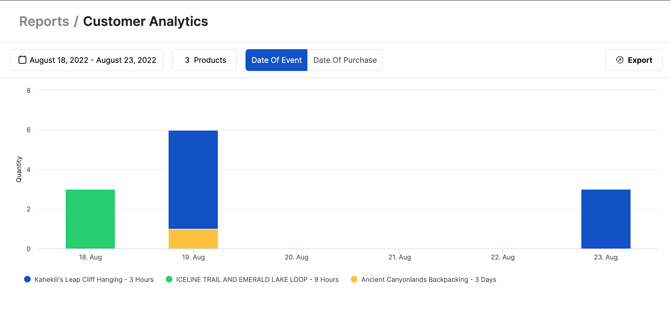
- **Products:** You can filter the report by products, with a specific focus on experiences. If 8 or fewer experiences are selected, the chart will display individual bars for each product. Hovering over these bars will provide a breakdown of the total customer count for both the individual product and for the entire day.
- **Date Range:** When choosing a date range, there are two options available:
- **Date of Purchase:** This will show how many customers made a purchase for an experience within the selected date range.
- **Date of Event:** This will show how many customers are booked for an event that occurs within the selected date range. Using this filter will allow you to choose date ranges that span into the future.
### What You’ll See in the Graph
#### Bar Chart with Customer Breakdown
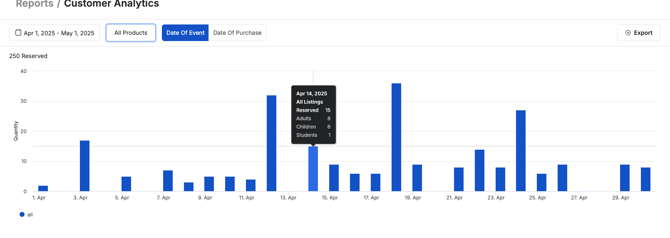
- **Quantity:** How many customers total
- **Date:** The date of the Purchase or Event
Hovering over the bars reveals the total customer count for each product and for the entire day.
If you filter by products and select 8 or fewer experiences, the bar chart displays individual sections for each product.
#### Additional Charts Below the Chart
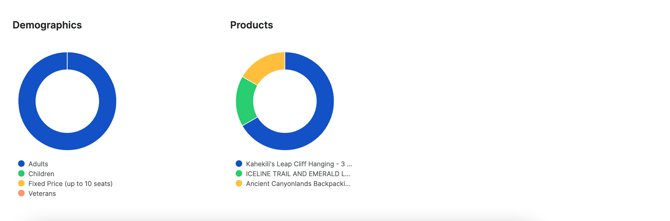
- **Demographics**: Shows the percentage of each demographic group across all purchases within the selected date range.
- **Products**: Displays the total number of reservations made for each experience within the selected date range.
**Note:** You can export the Customer Analytics Report as a **CSV or Excel** file. The export will include all reservations within your selected date range. Click on the **Export** button above the graph.
- [Getting Started](https://support.xola.com/getting-started?hsLang=en#main-content)
- [Account Setup & Configuration](https://support.xola.com/getting-started?hsLang=en#account-setup-configuration)
- [Website Integration & Installation](https://support.xola.com/getting-started?hsLang=en#website-integration-installation)
- [Flex Plans](https://support.xola.com/getting-started?hsLang=en#flex-plans)
- [Managing Purchases & Customers](https://support.xola.com/managing-purchases-customers?hsLang=en#main-content)
- [Purchases Management](https://support.xola.com/managing-purchases-customers?hsLang=en#purchases-management)
- [Reservation Management](https://support.xola.com/managing-purchases-customers?hsLang=en#reservation-management)
- [Customer Management](https://support.xola.com/managing-purchases-customers?hsLang=en#customer-management)
- [Customer Data & Engagement](https://support.xola.com/managing-purchases-customers?hsLang=en#customer-data-engagement)
- [Reporting](https://support.xola.com/reporting?hsLang=en)
- [Integrations & Advanced Tools](https://support.xola.com/integrations-advanced-tools?hsLang=en#main-content)
- [Xola App Store Integrations](https://support.xola.com/integrations-advanced-tools?hsLang=en#xola-app-store-integrations)
- [Partner & Agent Management](https://support.xola.com/integrations-advanced-tools?hsLang=en#partner-agent-management)
- [Marketing & Tracking Integrations](https://support.xola.com/integrations-advanced-tools?hsLang=en#marketing-tracking-integrations)
- [Mobile and Hardware](https://support.xola.com/mobile-and-hardware?hsLang=en#main-content)
- [Mobile Tools and Apps](https://support.xola.com/mobile-and-hardware?hsLang=en#mobile-tools-and-apps)
- [Hardware Setup & Devices](https://support.xola.com/mobile-and-hardware?hsLang=en#hardware-setup-devices)
- Company
- [About Us](https://www.xola.com/about)
- [Careers](https://www.xola.com/team)
- [Press](https://www.xola.com/press)
- [Support](https://www.xola.com/support)
- [Security Policy](https://www.xola.com/security-policy/)
- Resources
- [Articles](https://www.xola.com/articles/)
- [Help Center](https://support.xola.com/)
- [Success Stories](https://www.xola.com/success-stories/)
- [App Store](https://www.xola.com/app-store)
- [Demo](https://www.xola.com/demo)
- [Xola Universe](https://www.xola.com/universe/)
- Documentation
- [API Documentation](https://developers.xola.com/)
- [Payment Services Agreement](https://www.xola.com/payment-services-agreement/)
- [Terms](https://www.xola.com/terms/)
[](https://www.xola.com/)
© 2026 Xola Inc. All rights reserved.
[Privacy Policy](https://www.xola.com/privacy-policy) [Terms of Service](https://www.xola.com/terms)