
Cancellation Protection gives eligible customers added flexibility when their plans change. At checkout, customers with an eligible booking can choose to add protection for a fee.
If they need to cancel within the protection window, they can use the self-serve cancellation link in their confirmation email to cancel the full booking and receive a refund of the booking value. The protection fee is separate from the booking value and is not refunded when a covered cancellation is completed.
Cancellation Protection is designed to be revenue-neutral for the business when a customer makes a covered claim. The business keeps the booking revenue, while the program funds the covered refund. Standard cancellation and roster notifications are sent, and the cancelled spot becomes available again.
User Access: Administrator roles have access to enable Cancellation Protection in Xola.
To grant access to users, click here.
What's covered in this article:
- How to Enable Cancellation Protection
- How it Works on Checkout
- Email Sent to the Customer
- How the Customer uses Self Service
How to Enable Cancellation Protection
- Navigate to the Xola App Store by clicking the App Store tab on the left hand side.
- Locate Cancellation Protection, and select the App Store tile.
- Click the Install button.
- After installation, no additional setup is required. Cancellation Protection will appear automatically at checkout for your customers.
How it Works on Checkout
Cancellation Protection is an optional add-on. Eligible customers decide whether to purchase it when they check out.
Protection is available for eligible experiences when:- The trip start is more than 48 hours away
- The purchase is paid 100% upfront by credit card.
Before purchasing, the customer sees the protection fee and terms. These explain the cancellation window, the refund of the booking value, any-reason coverage, and the requirement to cancel the full booking rather than only part of it.
The protection fee is separate from the booking value. A covered cancellation refunds the booking value, not the protection fee.
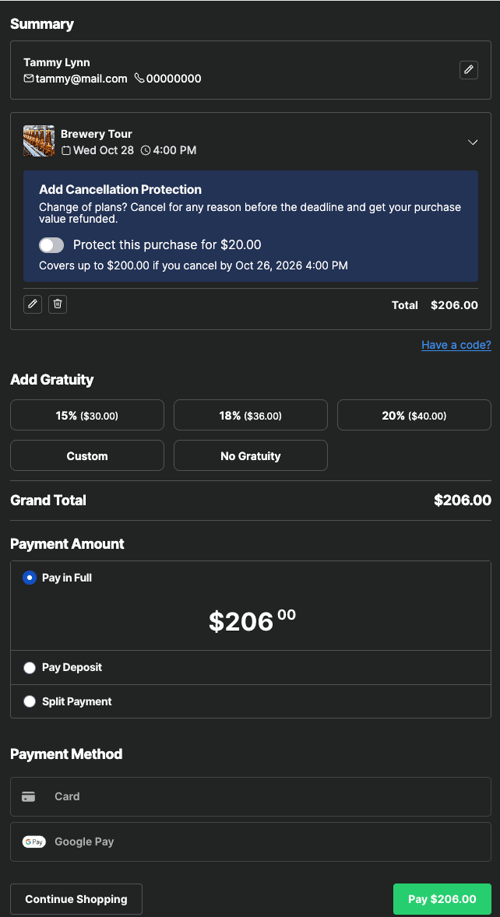
- If the customer chooses to add protection, they will receive two separate confirmation emails:
- Standard Confirmation Email: with their booking details.
- Cancellation Protection Email: From Xola, with their coverage details and cancellation instructions.
Email Sent to the Customer
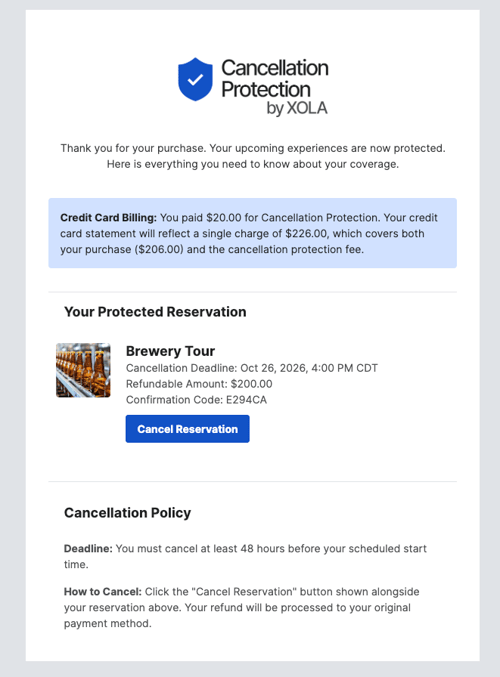
Customers who purchase Cancellation Protection will receive a separate protection confirmation email in addition to their regular reservation confirmation.
The protection email includes:
- Confirmation that the reservation is protected
- The Cancellation Deadline and protection window
- The Refundable Amount
- The reservation Confirmation Code
- A Cancel Reservation button that allows the customer to cancel their protected reservation
- The cancellation policy, including how and when to cancel and how the refund will be processed
The email gives customers the information they need to understand their coverage and manage a cancellation themselves.
How the Customer uses Self Service
If a customer asks you about their coverage: You will not see the Cancellation Protection purchase under the Purchases tab on their reservation. Direct them to their Cancellation Protection email for coverage details and cancellation information.
Customers can open the self-service cancellation link from their Cancellation Protection or confirmation email. What happens next depends on when they cancel.
Before the 48-Hour Window
If the customer cancels at least 48 hours before the scheduled start time:
- They can click Cancel Reservation from their protection email.
- In the self-service portal:
- See how much they paid and see that they have cancellation protection
- They'll be given an option to cancel the booking in the actions bar.
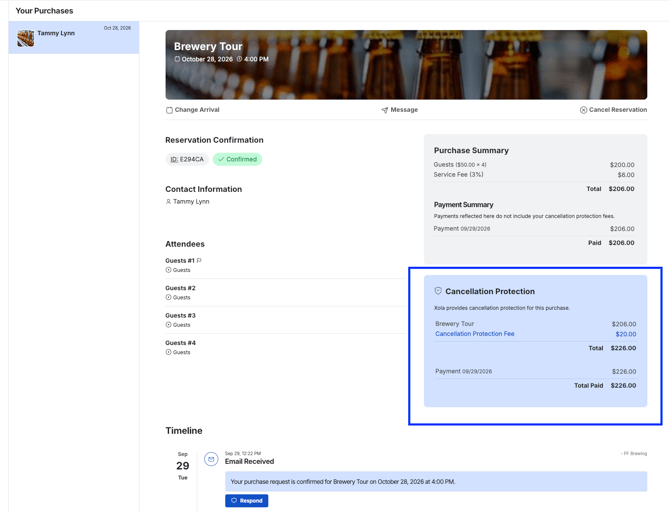
- Once they hit Cancel Reservation in the actions bar, a pop up will appear:
- The cancellation screen will show the refundable amount and the applicable Cancellation Protection terms.
- The customer must provide a reason for cancelling and confirm that they are submitting the cancellation voluntarily.
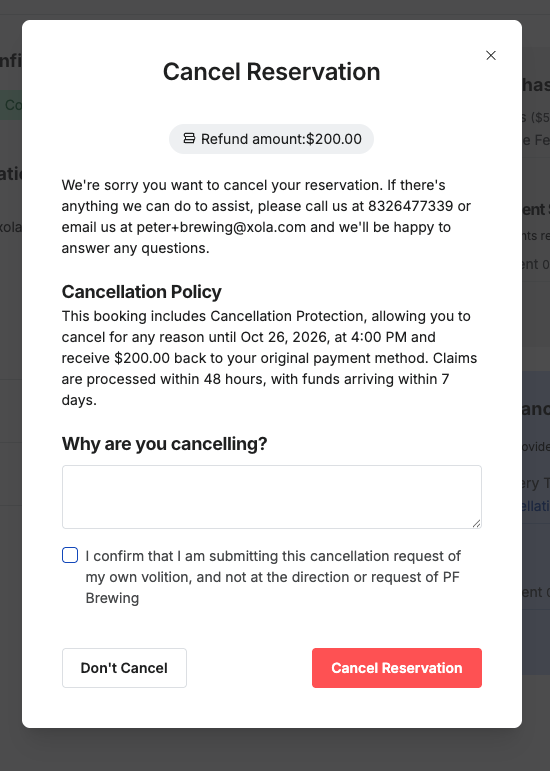
- Once submitted, the full booking value will be refunded to the original payment method.
- Claims are processed within 48 hours, with funds typically arriving within 7 days.
- The cancelled availability is returned to the experience, and you will be notified via email about the cancellation as usual.
Because the cancellation is covered by Cancellation Protection, the business keeps the booking revenue. Cancellation Protection by Xola funds the customer’s refund.
After the 48-Hour Window
Once the Cancellation Protection window has closed:
- The customer can still access the cancellation option from their reservation.
- The cancellation screen will clearly indicate that the Cancellation Protection window has closed and that the standard cancellation policy now applies.
- The customer will see the refund amount based on the standard cancellation policy for the reservation.
- If you have your own cancellation self-service options available, they will show. Otherwise, it will show 0%.
- Cancellation Protection no longer provides a covered refund after the protection window has closed.
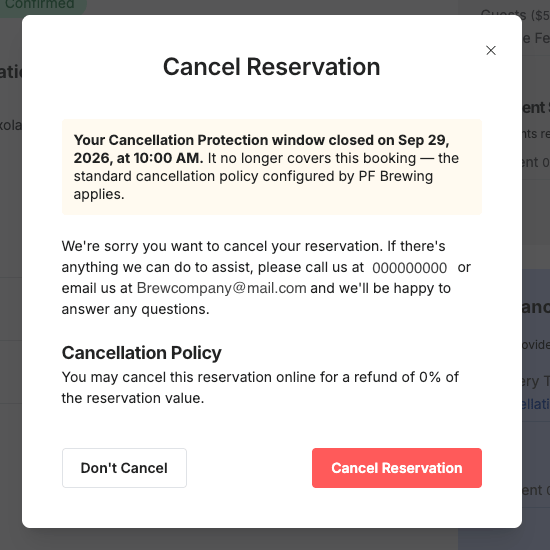
- If the customer chooses to cancel, the cancelled availability is returned to the experience, and you will be notified via email about the cancellation as usual.
If the customer cancels after the protection window, the business’s revenue is adjusted based on the refund amount provided under the standard cancellation policy.
To learn more about your Self Service options in Xola click here.