---
title: Applying and Removing Codes
description: This article provides instructions on setting up, applying, and removing different types of codes in Xola, including coupons, gift certificates, store credit, and agent codes. Learn how to apply codes during checkout, add them to existing purchases, and remove them if necessary.
---
[Skip to content](https://support.xola.com/applying-and-removing-codes#main-content)
English
Show submenu for translations
[](https://www.xola.com/)
- [Home](https://support.xola.com/)
- [24/7 Live Support](https://www.xola.com/support/)
Open main navigation
Close main navigation
- [Home](https://support.xola.com/)
- [24/7 Live Support](https://www.xola.com/support/)
- English
Show submenu for translations
- [Login](https://xola.com/_public/login.html)
[Login](https://xola.com/_public/login.html)
How can we help you?
- There are no suggestions because the search field is empty.
1. [Help Center](https://support.xola.com/?hsLang=en)
2. [Managing Purchases & Customers](https://support.xola.com/managing-purchases-customers?hsLang=en)
3. [Purchases Management](https://support.xola.com/managing-purchases-customers?hsLang=en#purchases-management)
# Applying and Removing Codes
## Easily Apply Codes, Coupons, and Credits in Xola
Whether you need to **redeem a gift certificate**, **apply a discount coupon**, **use an Agent code**, or **apply a customer’s store credit**, there’s always a **code** for that! These **codes** are designed to provide flexibility and convenience, allowing you to handle various **promotions**, **special offers**, or **customer credits** with ease.
With the correct **code** in hand, redemption is simple. You can apply it during a **Xola back-office purchase** or directly at **online checkout**, ensuring that your customers receive their **discounts**, **credit**, or **special pricing** without any hassle. This streamlined process makes it easy for both your team and your customers to manage **payments** and **promotions** efficiently.
**User Access:** **Administrator** roles have access to set up, manage and issue all codes in Xola
**Marketer** roles have access to set up and manage Coupon codes and view only Agent codes in Xola.
**Reservationist** roles have access to set up and manage Agent codes and can issue Store Credit codes.
**Administrator, Reservationist Lite** or **Reservationist** roles can add and remove codes from purchases.
To **grant access** to users, [click here](https://seller.xola.app/settings/users).
---
**What's covered in this article:**
- [Setting up the different types of Codes](https://support.xola.com/applying-and-removing-codes#setting)
- [How to apply a Code during a purchase](https://support.xola.com/applying-and-removing-codes#during)
- [Add a Code to an existing purchase](https://support.xola.com/applying-and-removing-codes#existing)
- [How to remove a Code from a purchase](https://support.xola.com/applying-and-removing-codes#remove)
---
### Setting up the different types of Codes
Click the links below to find an article on how to set up the different Codes:
- **[Coupon Codes](https://support.xola.com/xola-coupons?hsLang=en)**
- **[Gift Certificates](https://support.xola.com/gifts-and-gift-offers?hsLang=en)**
- **[Store Credit](https://support.xola.com/store-credit?hsLang=en)**
- **[Agent Codes](https://support.xola.com/agent-management?hsLang=en)**
---
### How to apply a Code during a purchase
- **[During back office](https://seller.xola.app/cart/init)** or online checkout, under the **Purchase Summary** to the right, locate the **Code** field.
- Click on the dropdown or enter the code you would like to use in the **Code** field.
- Select the **Code** you would like to use.
- Click **Apply**.
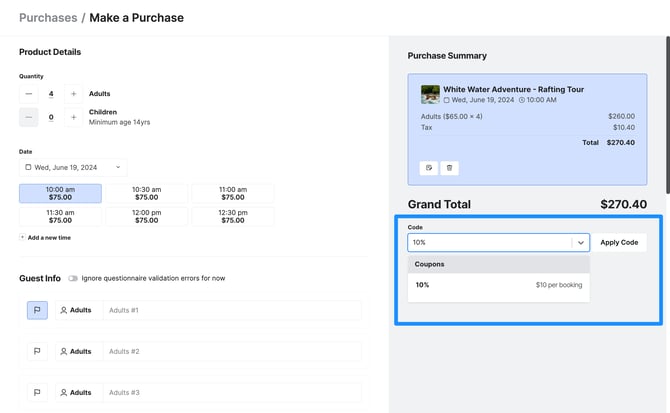
If multiple codes are applied, it will break out as separate line items in the customer's Payment Summary.
Certain Tags are auto-generated into the Tags & Internal Notes section of the customer purchase. These tags are searchable in the Purchases tab and your exported reports.
---
### Add a Code to an existing purchase
You've processed a customer purchase, and now they want to apply a coupon, Agent, voucher, or gift code. No worries! Xola will help you easily apply this code and adjust the purchase value.
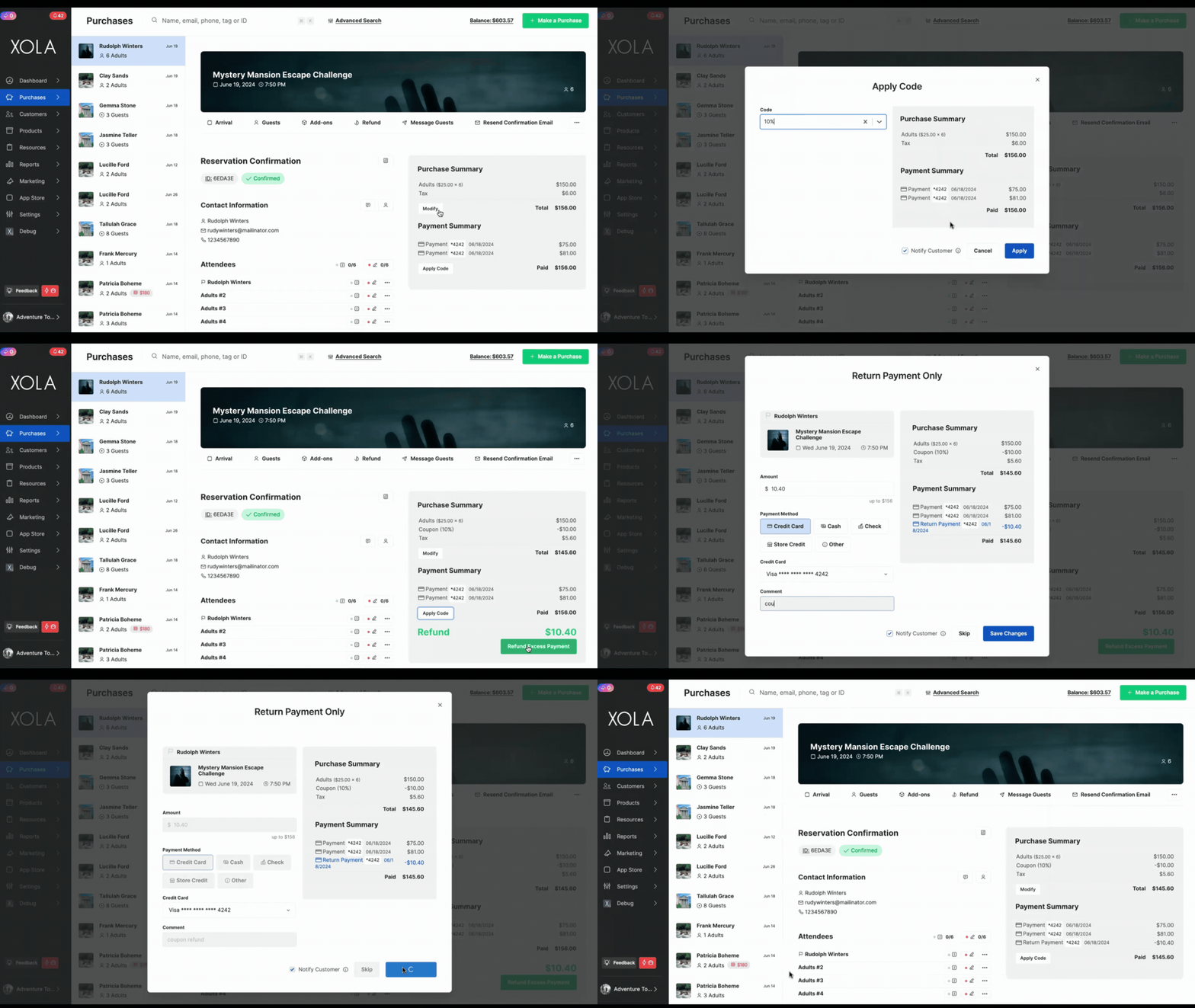
- In the **[Purchases tab](https://seller.xola.app/purchases/)**, navigate to the customer purchase.
- Below the Payment Summary, click **Apply Code**. A window will open displaying a drop-down menu and the customer's payment summary.
- Click the drop-down to view all the coupon and Agent codes for this account, or type in the code to search.
- Select the code from the list, or if you've typed it in, hit **Enter** on your keyboard. The code will be applied and appear in the Payment Summary.
- Click **Apply**.
- Click the **Return Payment** button to finalize this transaction. The code will be recorded in the Payment Summary and in the customer purchase timeline.
---
### How to remove a Code from a purchase
Whoops! You may have applied a coupon by mistake or entered the wrong Agent code. In Xola, you can remove a code just as easily as you can add one. Details below!
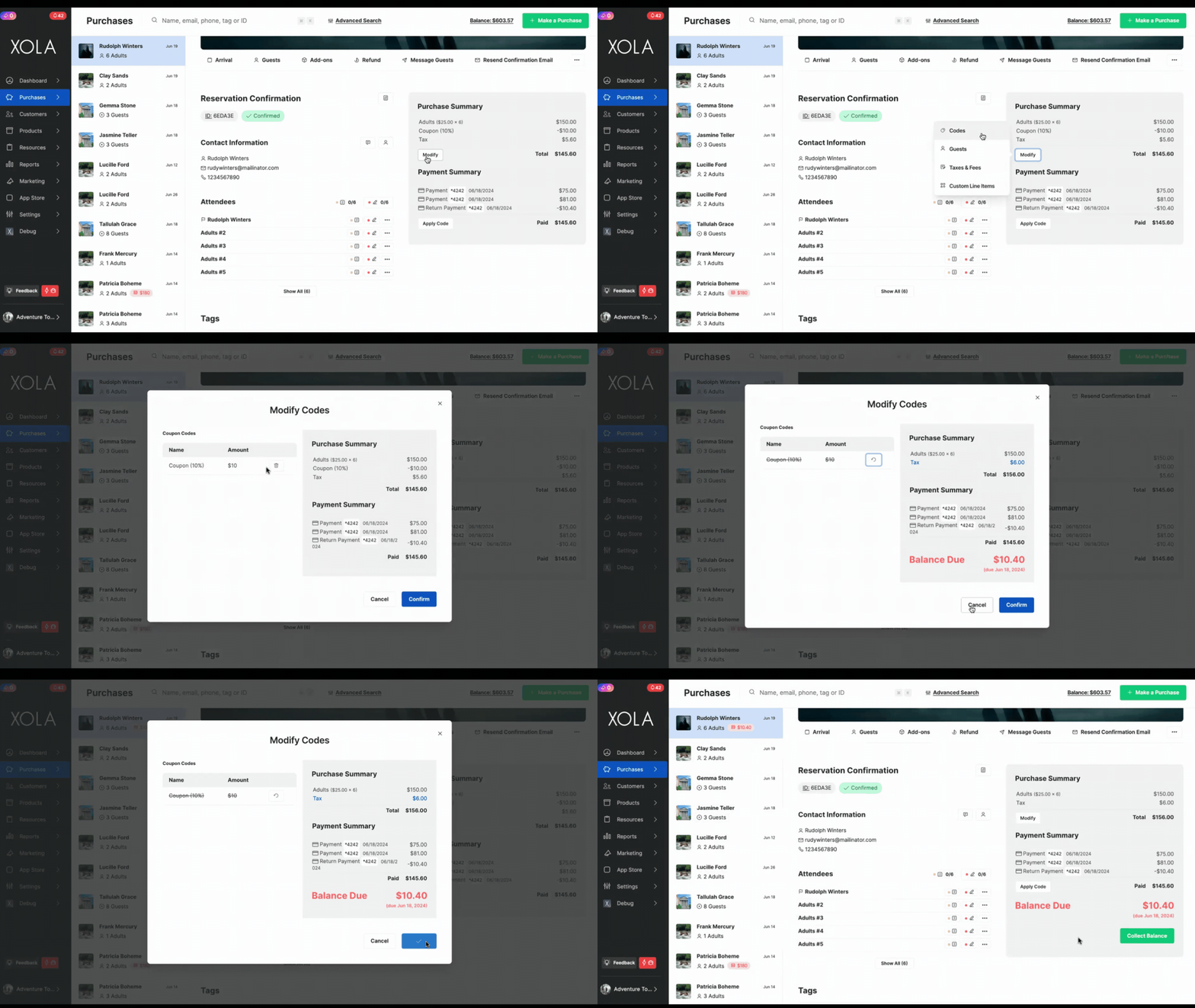
- In the **[Purchases tab](https://seller.xola.app/purchases/)**, navigate to the customer purchase.
- Under the **Purchase Summary**, click **Modify** and select **Codes**.
- Click the trash icon next to the code you would like to remove.
- You will be asked to confirm that you want to remove this coupon. Click **Confirm**.
- The code will be removed from the customer purchase. If it is a coupon code or an Agent code with a discount associated, the price will adjust accordingly.
- [Getting Started](https://support.xola.com/getting-started?hsLang=en#main-content)
- [Account Setup & Configuration](https://support.xola.com/getting-started?hsLang=en#account-setup-configuration)
- [Website Integration & Installation](https://support.xola.com/getting-started?hsLang=en#website-integration-installation)
- [Flex Plans](https://support.xola.com/getting-started?hsLang=en#flex-plans)
- [Managing Purchases & Customers](https://support.xola.com/managing-purchases-customers?hsLang=en#main-content)
- [Purchases Management](https://support.xola.com/managing-purchases-customers?hsLang=en#purchases-management)
- [Reservation Management](https://support.xola.com/managing-purchases-customers?hsLang=en#reservation-management)
- [Customer Management](https://support.xola.com/managing-purchases-customers?hsLang=en#customer-management)
- [Customer Data & Engagement](https://support.xola.com/managing-purchases-customers?hsLang=en#customer-data-engagement)
- [Reporting](https://support.xola.com/reporting?hsLang=en)
- [Integrations & Advanced Tools](https://support.xola.com/integrations-advanced-tools?hsLang=en#main-content)
- [Xola App Store Integrations](https://support.xola.com/integrations-advanced-tools?hsLang=en#xola-app-store-integrations)
- [Partner & Agent Management](https://support.xola.com/integrations-advanced-tools?hsLang=en#partner-agent-management)
- [Marketing & Tracking Integrations](https://support.xola.com/integrations-advanced-tools?hsLang=en#marketing-tracking-integrations)
- [Mobile and Hardware](https://support.xola.com/mobile-and-hardware?hsLang=en#main-content)
- [Mobile Tools and Apps](https://support.xola.com/mobile-and-hardware?hsLang=en#mobile-tools-and-apps)
- [Hardware Setup & Devices](https://support.xola.com/mobile-and-hardware?hsLang=en#hardware-setup-devices)
- Company
- [About Us](https://www.xola.com/about)
- [Careers](https://www.xola.com/team)
- [Press](https://www.xola.com/press)
- [Support](https://www.xola.com/support)
- [Security Policy](https://www.xola.com/security-policy/)
- Resources
- [Articles](https://www.xola.com/articles/)
- [Help Center](https://support.xola.com/)
- [Success Stories](https://www.xola.com/success-stories/)
- [App Store](https://www.xola.com/app-store)
- [Demo](https://www.xola.com/demo)
- [Xola Universe](https://www.xola.com/universe/)
- Documentation
- [API Documentation](https://developers.xola.com/)
- [Payment Services Agreement](https://www.xola.com/payment-services-agreement/)
- [Terms](https://www.xola.com/terms/)
[](https://www.xola.com/)
© 2026 Xola Inc. All rights reserved.
[Privacy Policy](https://www.xola.com/privacy-policy) [Terms of Service](https://www.xola.com/terms)